Personal background agents in dangerous mode are a few hundred lines of code away with the 2.0.19 release of Claude Code. This matters because running 4+ coding agents at a time, including fully autonomous agents that run for multiple days, is quickly becoming a reality.
This post is about some emerging patterns when you want to connect Claude Code sessions together in multiple cloud VMs without going full-on Gastown. The urgency behind all of this is related to security and prompt injection attacks when running locally. As Simon Willison said in October 2025:
On the one hand I'm getting enormous value from running coding agents with as few restrictions as possible. On the other hand I'm deeply concerned by the risks that accompany that freedom.
The (imperfect) technical solution is a sandbox—ideally one that's not on your computer or network. This is already built into the web interfaces of Claude Code for Web and ChatGPT, but let's make three more assumptions:
- You're a developer using a coding agent on a command line.
- You're starting to run 4-10 coding sessions at a time, and it's getting chaotic.
- You want a way to centrally manage and monitor those sessions.
In other words, if you're adopting sandboxes: you now get to manage a small fleet of cloud VMs or try to use some sort of container orchestration thing. This is a nightmare for non-experts using the major cloud providers as of early 2026, and even Opus 4.5 struggles with AWS IAM policies and the Azure CLI.
Enter a new category of "sandbox-as-a-service" products from exe.dev, sprites.dev (fly.io), Modal, Cloudflare Sandbox SDK, and E2B. You get a remote, fully stateful server that spins up in a few seconds: a perfect and isolated home for Claude Code, Gemini, or Codex.
My rough CLI implementation of doing this with sprites and exe.dev is at github.com/smithclay/ocaptain, but expect there to be 10,000 orchestrators created in the next few months before Claude Code or Codex releases something that obsoletes them.
Get a full Linux VM in a couple seconds, seriously
With exe.dev or sprites.dev, the idea is simple. You use a CLI (or ssh session, a cool twist on how exe.dev does it), and type something like this:
$ ssh exe.dev new
$ sprite create your-sprite
A few seconds later you get a full Linux VM you can do whatever you want with: run Docker images, run Claude Code, run Codex, install services, whatever. It won't go away. The pricing is reasonable (cost of a coffee and croissant in San Francisco per month) and it's fast.
Living dangerously and obscure Claude Code token settings
Once you go multi-Claude Code, the immediate hurdle is logging into your subscription on multiple VMs or containers: a fresh start of Claude asks you to log in. If you're an API user it's easy to generate a new key, but for subscription users it's a different story.
I lost four hours on a sunny and warm Saturday vibing elaborate token injection proxies before learning something critical: there's just a poorly-documented command to get an OAuth token tied to your subscription that lives for one year. Run claude get-token, and set that token using a special environment variable (CLAUDE_CODE_OAUTH_TOKEN).
You can revoke or manage the token at https://claude.ai/settings/claude-code. That's it.
When launching an autonomous session in interactive mode, it's also helpful to disable the onboarding flow:
echo '{"hasCompletedOnboarding":true}' > ~/.claude.json
Since you're in an isolated VM with none of your data, it's relatively okay to run Claude with --dangerously-skip-permissions – that means no prompts will pop up for permissions.
It's also a good idea to set up some outbound firewall rules on the VM while you're at it to specific domains only.
Task orchestration without external dependencies
Before Friday, January 24—the release of Claude Code 2.1.19—task orchestration across sessions was largely a roll-your-own sort of thing, the most popular solution being Steve Yegge's beads. But now, with an upgrade to the task management system in Claude, it's straightforward to generate and distribute tasks, dependencies between those tasks (e.g. write API, then write API integration tests) and status across sessions.
All you need are some JSON files that you can generate yourself or with a skill, Claude Code handles the rest. Each instance of Claude Code gets passed a special environment variable called CLAUDE_CODE_TASK_LIST_ID that identifies a shared task list that lives in a collection of JSON files in ~/.claude/tasks/<task id>. After the session starts, the task list pops up and updates automatically in each session: just ask Claude to pick up an item that needs work and that isn't blocked. You can set up a hook that fires to notify you when all sessions end and there are no tasks left.
Here's what it looks like, note the task list below that has been picked up by multiple "ships" (separate VMs, my orchestration CLI has a nautical theme). You can attach via tmux to the live Claude Code session at any time to see what's going on, but probably won't:
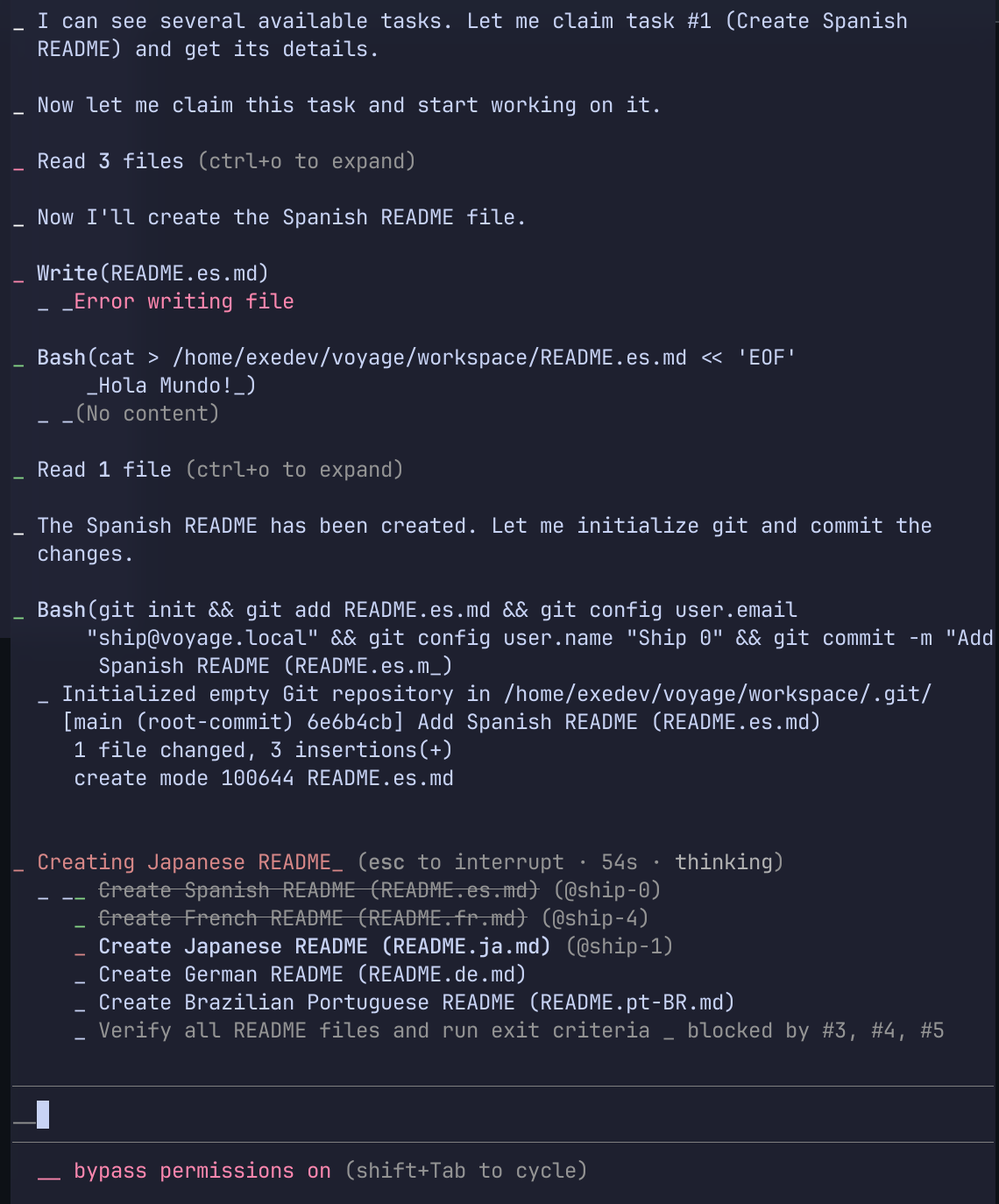
In terms of sharing the ~/.claude/tasks directory across VMs, I initially used sshfs to mount a shared directory across my exe.dev machines, but many approaches are possible: it's just a regular Linux VM so choose your favorite network filesystem. Claude Code handles the file locks between sessions. For VMs without SSH access, creating your own Tailscale tailnet is also compelling.
There are some sharp edges, but initial testing for semi-complex tasks is promising. The capabilities around this in Claude Code are likely to grow, as recent hidden feature flag investigations have shown.
Trust but verify with logs and metrics from sessions
When you're scaling up to even a modest number of VMs, what's going on inside those sessions is a quasi-black box: you're no longer babysitting, approving permissions, or seeing tool calls go by. All you see is the end result of the sessions. Some level of logging and analytics is needed, and fortunately Claude Code and Codex can output relevant events and metrics in OpenTelemetry format.
Nowadays, it's easy enough to store those logs and metrics in parquet format on disk or in cheap object storage (see the otlp2parquet or otlp2pipeline projects). Several weeks of heavy sessions for a single user take less than 100 MB of storage. It's a low enough volume you can easily query and do some meaningful analytics on it with duckdb on a laptop or even in a web browser. Potential queries include: understanding cost per session, token count/cached token count over time, tool call errors, tool calls to external domains, etc.
The OTel-to-parquet/Iceberg workflow works nicely with AI-assisted notebook tools like Sidequery or Marimo: you don't even have to write the SQL or pandas code and you get some nice visualizations.
What we wanted serverless to be in the late 2010s
Looking back: this is probably what we always wanted serverless compute to be in the first place… just took us a while to get here.
In 2017, I wrote a small Go program so I could ssh into an AWS Lambda function as a joke for a conference talk: back then, there were—and still are—many people who didn't like functions-as-a-service architecture ("it's still a server!", "containers are better", "the cost model doesn't make sense", etc).
This new wave of infrastructure providers settles the architecture debate: you get all the benefits of a serverless function (fast, ephemeral, cheap) but it's also a full VM. This pattern is also more relevant than ever with millions of developers starting to use coding agents in more sophisticated ways that require remote and secure sandboxes.
It's a fun time to build stuff using cloud sandbox VMs, and it's likely to evolve a lot in the next 6 months. Just don't run YOLO mode on your personal laptop.
Links and acknowledgements
- exe.dev docs: https://exe.dev/docs/what-is-exe
- Sprites docs: https://docs.sprites.dev/
- My own CLI impementation of this post: https://github.com/smithclay/ocaptain
- Simon's blog is great and he has been convering sandboxes extensively: https://simonwillison.net/2026/Jan/9/sprites-dev/
- OTLP to parquet converter, useful for monitoring: https://github.com/smithclay/otlp2parquet